You might also like...

Showing posts with label technogeek. Show all posts

Wednesday, March 23, 2022

Installing Alexa - Amazon Echo in the bathroom

 This is the problem with serious events of colossal size - it's hard to move on from them. Once I wrote a post on Lata di there was nowhere to go. How could I talk about something trivial after talking about that superhuman human being? But this post will work for that. Lata di may be gone in her physical form but her voice will always be with us as a gift from the universe for ages. 

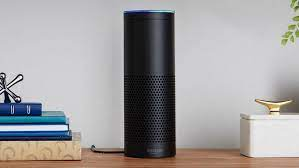
Here is the project outline. I am a big fan of Amazon Echo aka Alexa. I have several devices of different types and I want to buy a couple more. Two of these devices are close to each other and step on each other's toes when I say "Alexa!" One is an original Echo first gen in black. I bought it on pre-order before it came out. 


It still works perfectly. Too perfectly I would say because I have an echo dot second gen, this one in the kitchen. 


Most of the time when I want to talk to the Echo Dot the bigger Alexa from the living room jumps on that command like a big brother grabbing the younger one's dessert. The reverse also happens but not often, you know how sweet and decent younger brothers are :) (I am the youngest of 4 brothers). 

On the flip side, I don't have any Alexa in the bathroom and I wanted to have music in the bathroom. When I first bought my Samsung Note 20 Ultra, one time I was able to change the song from within the shower with the water running. That was an exciting day! It was also a unique day. It never happened again. Another problem with using the phone for music in the bathroom is that I have to remember to take the phone with me and set up everything beforehand - start Spotify, find my playlist, adjust the volume to the optimum level...you get the picture. I also don't want messages and emails to interrupt my music. 

If I had Alexa in there those things can all be sorted out because: 
1. Alexa has great hearing thanks to its multiple mic's. 
2. It can play music from Amazon Music or Spotify
3. I can adjust the volume at any time even from the shower. 

Then what's the challenge? There are multiple challenges: 
1. Alexa comes with its own power adapter with a 3-pin (in UK) plug on one side and a narrow pin on the other side. No USB of any kind.  
2. There are no plugs in the bathroom for that, for obvious reasons. I do have a socket for the shaver but even that has gone the way of the pharaohs. 
3. Bathroom is often full of humidity and steam and Amazon Echo devices are not waterproof. Why would you want to send your beloved Alexa on a suicide mission? 

In the words of Sheldon Cooper "...you know me to be a very smart man." Here is what I came up with. I bought an adapter cable that goes from USB-A to the thin Alexa pin  it was not very expensive and came the next day. I have a huge repository of power banks of different sizes. Seriously, I don't even know how many I have in total. Definitely more than 10 and maybe even more than 20. These are all collecting dust (I dust them often though.) except when I go out for an overnight trip and pick a couple of them based on "eenie, meenie, miney, mo..." 


Picking up one of the spare power banks of 10000mAh capacity, I plugged it into Echo dot with the new cable. Echo Dot came to life and responded to my commands. 


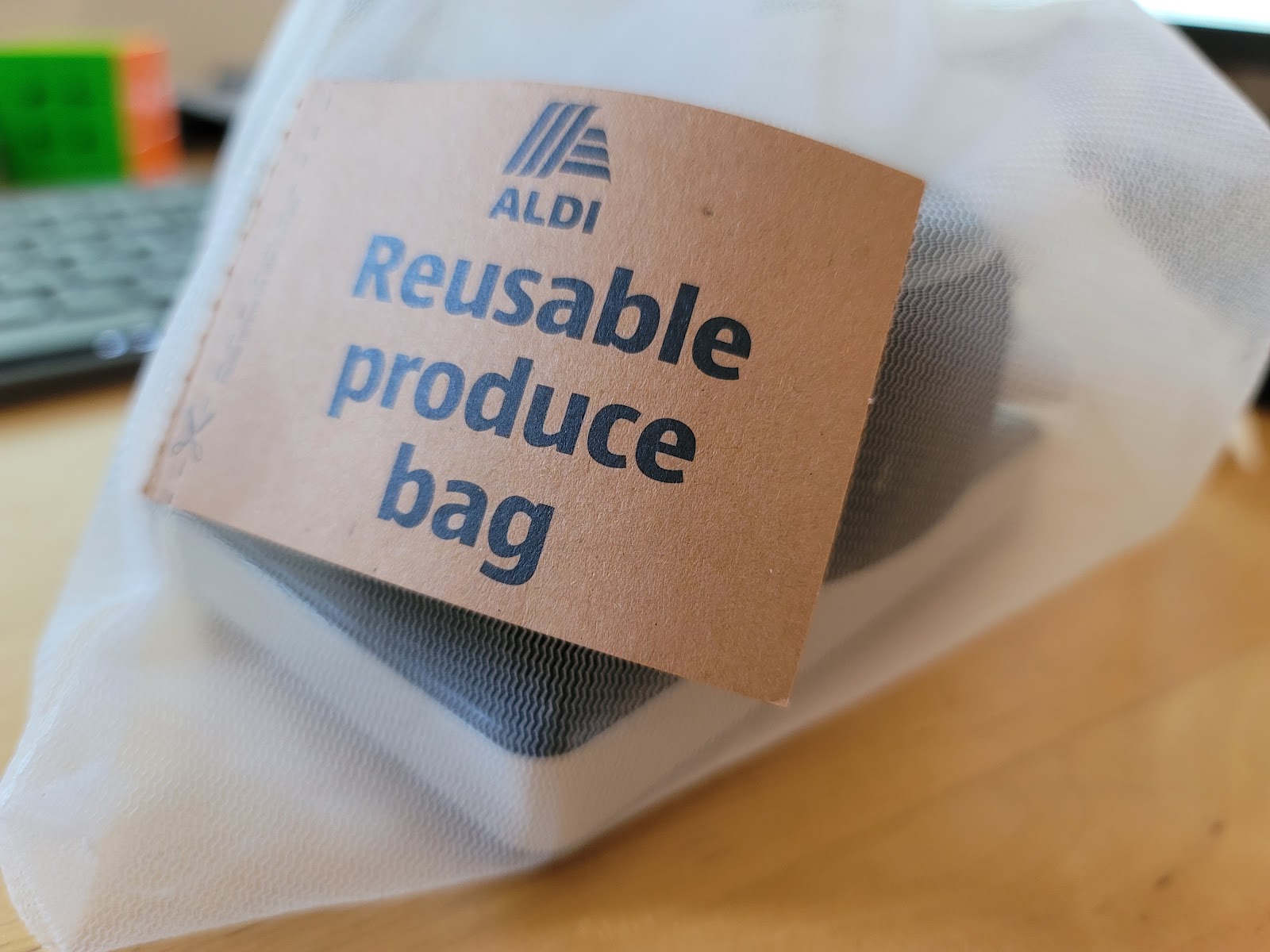
Then I put them both in a "produce bag" I recently got from a supermarket. It's a mesh bag that would block some humidity but not the sound. The idea was to hang the bag from some place in the bathroom using its cord. It didn't work. You need to keep the Alexa away from the toilet (germs), from the shower (steam, humidity), from the heated towel rack (heat) and once you do all that you run out of options. 


But there is a medicine cabinet, every bathroom has one (usually). I made some space in that and put the bag inside. Magic!

Alexa can hear me every time without fail even from inside the shower with the water running and the cabinet doors closed. The cabinet works like a speaker "cabinet" and adds some "reverb" to the music which is pretty cool. 


I don't know how long the power bank would last with the occasional usage this Alexa would see but I am expecting to change power banks maybe once or twice a week. But even if I have to change a power bank everyday, it's worth it for me. 

Now I can say "Alexa, play Lata Mangeshkar songs!"


Wednesday, January 13, 2021

Bye Bye Whatsapp


 Heinlein once said "Don't appeal to a man's better side, he might not have one, appeal to his self-interest instead."

Everybody has a self interest and big businesses have big interests. 

I am answering the question you haven't asked yet. 

Whatsapp is going to start sharing their user data with Facebook from 8th Feb 2021. 

When someone asks "Why?" about anything, usually the answer is "Money."

Facebook and Whatsapp are owned by the same corporation and Whatsapp has phone numbers and other data from their users that Facebook doesn't have. Some of this data may include the location of the users as Whatsapp is exclusively a mobile app. (Yes, I know they have a web client but it is tethered to the mobile app.)

By getting this data from Whatsapp, Facebook will be able to serve more ads and other marketing to their users. 

There are two caveats to this in my case: 

1. I am in UK and the new terms will not apply to UK and EU users. Yet. 

2. The new terms are optional. For now. 

Here are the reasons that I am still moving away from Whatsapp on 1st Feb 2021. 

1. Even though it's not applicable in UK, I have family and friends in India, US, Canada and other non-EU parts of the world. Being in IT I do understand how much data an app can collect on me through those indirect channels even if they can't share my data directly. This is called "Big Data" and  you would not believe the tools that are available to analyse this data and create amazing trend reports. 

2. I already hate FB for how much of a marketing-whore it has become. I plan to move away from it later this year. 

3. The terms maybe optional now but they won't be for long. 

4. This is just an evil trend and I want to dump this app now. 

And, this one is a bonus. 

5. So many of my friends and family are moving to Signal that I can easily move. 

Credit to my nephew Gaurav for bringing this to my attention. Now he's the trendsetter in our family. 

Here is a poll from androidpolice.com on this issue. Apparently out of the 10000 respondents only 30% are still on Whatsapp. 

Android Police Poll

If you are looking to move to Signal, here is the download link - https://signal.org/

It's an open source app, has a proper desktop app that connects with the mobile, same as Whatsapp used to do. Yes, I have read their privacy policy, no evilness so far. It has end-to-end encryption like Whatsapp. 

Finally, I can't resist this quote from "Serenity". 


Monday, February 24, 2014

Samsung Galaxy S5 - Finally Launched


Since I just spent an hour watching the Samsung Unpacked event streamed live from Barcelona, I might as well tell my readers what I learnt.

Galaxy S5 - Fingerprint scanner, 5.1" super AMOLED Full HD screen, yes, I was disappointed as I was hoping for a 2K screen, but there are some innovative improvements in display technology that will make this a unique display. The design is a bit disappointing after watching all those "concept" videos. It's a simple S4-like shape and design, with a perforated back (so I am assuming a metal body not plastic). It has a heart rate sensor.

The fingerprint scanner can be used for making paypal payments. Would be good if I didn't already hate paypal.

Although it's not waterproof it is water and dust resistant, the rating is IP67. I doubt that it would let me sing along in the shower as the Samsung VP J.D. Ayme was urging everybody to do, but at least it would be safe to take the phone out in the rain. I live in London, this is a big deal for me.

The camera is a 16 MP camera with many improvements. This one did impress me. The sensor is bigger, the autofocus is faster, there is even selective focus to emulate DSLR-like shallow DOF. It looked very good on screen. There is HDR for both stills and video. 0.3 seconds response time.

They didn't talk about the processor or RAM, that seems to be tomorrow's agenda on their event. The battery is 2800mAh, that was a big disappointment. There is a Ultra Power Saving mode that turns off everything except essential functions and even turns the screen to black and white. Samsung claims that in this mode the phone can last for 24 hours on standby on 10% battery left. Well, I would have preferred a 3200mAh battery.

The release date is April 11. 

Friday, June 01, 2012

Samsung Galaxy Note - My Review


Since I am expecting to get my next phone - Galaxy S3 today I think this is the right time for me to write a review on my last "new" phone - the Samsung Galaxy Note - N7000!

There is not a lot to say except that it's an amazing phone and I am very happy with it. I bought it about 2 months ago, I have been using it every day despite its big size and I just love it! I still have my Galaxy S2 and that's also a great phone but I had basically kept it as a "small" phone for going out and stuff where the Note may be too big. So far, I have not had a situation where I'd want to leave the Note home. On the other hand, I have actually left the S2 home sometimes mainly because the sim in it is for my second line and if I am going to take only one phone with me I'd rather take the big-screen wonder that's the Note.

On the train, that big screen is fantastic! I have stopped carrying my 7" tablet because of the Note. The screen, in size and quality, is quite good enough to watch media without carrying a bag to carry the tablet. The Note fits fine in my jeans pocket and is too small for my jacket pockets. When the Note had come out I had decided not to buy it because of the huge size. These days I don't even feel the huge size, I think it's just the right size. Compared to it my S2 feels small, I don't know how an iPhone would feel, tiny?

I have not been able to use it much as SatNav in the car mostly because I have not been able to find the kind of car holder I was looking for. I did use it once for a short distance and it is awesome to have that 5.3" screen for all the information. So convenient. You can't describe it, you can only experience it!

I have used it while walking around, using Google Maps and it works very well. Very responsive and of course the big screen helps you see more.

Come to think of holders, I haven't been able to find a really good case for it either, with a good kickstand. I have tried 3 so far, all failed. So these days I use my GorillaPod for watching videos on it and that works.

The speed is really good. According to benchmark it's not as fast as the S2 but the 1.4 GHz, dual-core CPU is really good and the experience is amazing. On that big screen you can set-up widgets that look good. I try not to overdo it. I am using Nova Launcher, the free version, which gives me 5 home screens and a 3screen dock below, plus resizable widgets. Mostly I just use a home weather widget, a facebook feed app and a Google reader app, plus a couple of small things like minimalistic text time and Google search bar.

The S-Pen, or as you might call it, the stylus, is very good. When I had read reviews and people said they don't use the stylus much, I was like, yeah, they are idiots, but actually I don't use it much either. And yet, it's indispensable, I love it! It's the stylus that keeps motivating me to sketch even though I am crap at it. It was because of this that I bought a sketchpad and a set of pencils. I still don't use them, but I do use the Note and the stylus to draw once in a while.

Even though I don't use the stylus a lot, when I do use it, there's nothing to replace it. For example when on the phone and looking to jot down something quickly, I look for a pen. There are 100's of note-taking applications for Android but I always ended up making a note in the SMS. But stylus is a pen, so when I start looking for a pen, I find it quickly, and just a double-tap on the screen with the S-Pen launches a new note in S-Memo where I can write in my own handwriting. Absolutely perfect solution!

Another place where the stylus is indispensable is  taking a screenshot. It's perfect. You can even doodle on the screenshot. With ICS Samsung has also launched "S Note" for the Note which lets you combine photos, maps, screenshots, handwriting and other media in a variety of creative and useful ways. It's just awesome!

The Note is much closer to being a laptop-replacement than any other phone so far. The big screen makes it much more usable. The keyboard is bigger, the webpages are easy to read...I love to post photos from Note to Facebook, or my own drawings. Once I edited a video, annotated it and uploaded to Facebook without touching the computer at all.

I had the foresight to buy the phone in white colour which is awesome. It looks so good, even after two months of using it, I still love the form factor and the design. This is one phone that makes even my iphone owner friends, "Well, have to admit that's a great phone for watching a video."

That's another thing about the Note. People just cannot ignore it. How can they, it's so big! I use it all the time to share a YouTube video with my film group in a meeting. Now that I am making films, it's good to have a phone like Note to show people your work.  Last time we had an audition I had to meet 7 girls, each at half-hour intervals, and one after the other all seven of them asked, "What is that?" "Is that a phone?" "Is that a phone or tablet?" "Oh, is that the Galaxy Note?" It's an attention grabbing phone!

Wow, I guess  I did have something to say about the Note after all! And I can still go on.

The battery life is very good. Not as good as the S2 but the 2600 mAH bettery lasts through a day of normal use. With my heavy use especially when I go out, I have 2 spare batteries. They are cheap and easy to change. Because I watch videos on the train to London, use Google Maps when location scouting and use the internet heavily, plus normal phone calls, texts and IMs, my usage when out is very heavy. Usually I end up using about 1.5 batteries round-trip. That includes travel in the tube as well when there is no signal and the phone spends battery power in signal search (normal mobile phone) behaviour. I also use bluetooth continuously for media as well as phone calls, that also drains power.

Browsing the web is a joy on this and I feel the difference when I do the same thing on my S2. Because of the screen size and resolution I am much more comfortable browsing a full desktop site on the Note than on S2.

The speaker volume is very good when at home, I can play it in one room and hear anywhere in the flat. It's just such a versatile, beautiful, fast, amazing phone. I don't think even S3 can top it in some respects but then, I am not planning to replace it with S3 so there's no real competition for me.




Wednesday, April 18, 2012

iPhone sucks - more facts


My original iPhone sucks post became too long, especially with all the people chiming in with additional reasons but I still keep finding out more reasons in conversation with iPhone owners.

So I decided to post a new one and collect the additional reasons here. Some of them are strong, other just inconveniences.

1. Those who own glass phones....shouldn't drop them! I was talking to my friend and she almost dropped her iPhone. Then she commented that she has done it before, and anybody she knows who owns an iPhone has dropped it once or more. It results in either the screen or the glass back shattering or cracking and they have to send it away to be replaced. Yeah, of course they have to pay or make sure they insure it and keep the premium payments up. She showed me hers, it had one big corner of the screen cracked. She was waiting to drop it again before sending it in.

So, this is how innovator companies do it, put a piece of glass in the front and back that'd make the phone heavy and crack easily. Does anyone think that Apple treats their users like suckers?

(I did a search for "iphone cracked" for the photo for this post and was spoiled for choice. As a matter of curiosity I did one for "Android cracked". Very few images...about 7 or 8.)

2. Free apps One of the commenters on the original post mentioned this. About 29% of the apps on iPhone App Store are free, whereas on Android 60% of the Apps are free. Funny thing is some of the same apps, by the same company/developer are free on Android but not on iPhone, for example, Angry Birds.

3. Back button Several commenters chided me for not mentioning this in the original post. On Android you can use the Back button to track back out of the menu system or applications. On iPhone you'll always be hunting  for some on-screen button to find your way around. Major navigation drawback.

4. Siri in UK. Siri, the much-touted voice-controlled virtual assistant software that prompted uncounted sales for the iPhone 4S is actually almost completely useless in the UK. That's not something Apple tells you before you buy the expensive, overhyped toy.

Another thing they don't tell you in the flashy (yes, I said that) iPhone 4S ad's is that Siri is actually in Beta. And it's not the kind of Beta that gmail was where everything worked even in Beta phase, it's the kind of Beta where people have issues with making it work or having it stop after a while.

If you don't believe me check Apple's own site and community forums. Here's a useful link and quote

"Siri is currently in beta and we’ll continue to improve it over time."
from http://www.apple.com/iphone/features/siri-faq.html

5. No multi-tasking. Even with iPhone 4S and 1GHz CPU the iPhone has no real multi-tasking. If you open a website and press Home to go do another task..when you come back to the browser, the site would not have loaded, it'd have frozen where you left it and will continue now.

Some of the commenters mentioned how the iPhone "decays" over time in terms of hardware and performance, like dropping calls etc. I can't comment as I have never owned one myself but people I have met before have mentioned things like that.

I'll probably update this post as I find more reasons.

P.S. A friend of mine told me he bought an iPhone because...wait for it...he doesn't like the colour of the background in the settings menu on Android. He's apparently okay with the restrictive interface of iOS where he can't arrange the app icons in anyway but a menu that can be customized with any of the many free Android themes offends his sensibilities. What do you think, fanboi in the making? 

Tuesday, February 21, 2012

How many Windows 32 (bit) or 64 (bit)?


These days I am editing a film (I'll tell you about it later) and I have been having problems. I used to think that running Second Life client was the most resource hungry thing to do on a laptop but now I found that video editing is the most resource hungry thing you can do on a computer.

So when I play an edited scene without rendering it, it moves slowly, skips frame or doesn't sync audio and video. Sometimes it just doesn't play until I render it first. Which can be annoying when you want to make a 1000 little changes and rendering every time disrupts the creative flow.

Like any other normal user (which I am usually not) I checked and re-checked my laptop specs. It's a Dell Studio 17 inch laptop with a 1GB Intel Radeon graphics card and 4GB RAM. The processor is Intel Core Duo with 2.53 GHz speed. In this world where tech specs change overnight, this is by far not the fastest machine not even in laptops. But it's a good spec. I like to change my laptop every year, but I have had this one for 2 years now because it's absolutely amazing. It suits me in every way including performance. Until now, that is.

I didn't really want to change the laptop just for this, for two reasons. One, I like this laptop as I said. And two, when I change I want to upgrade to a super-expensive Alienware model with astronomical specs. Which I can't afford right now.

But there are things you can do short of buying a new laptop. Like PCs you can upgrade a laptop's hardware too, in a limited way. I decided to upgrade the RAM. It already has 4GB installed in the form of two 2GB memory modules. It has only 2 memory slots (it's a laptop after all), so I could replace one 2GB module with a 4GB getting a total of 6 or replace both. I checked that memory is cheap from Dell, only 22 GBP for a 4GB RAM module. So, I decided to buy one and bring my total RAM to 6GB..except for one thing!

Every time I check the tech spec's by right clicking on My Computer and clicking Properties, it shows RAM as 4GB (2.99 GB available.) It's the figure in the bracket that puzzled and perplexed me. What do you mean 2.99 GB available, I asked it, have you loaned the other 1 gig to the neighbour or what? It didn't answer.

You can guess that I wouldn't leave it at just that. I escalated the matter. I called Chauhan Sir (remember Chauhan Sir?). He set me straight. This poor little computer is running on Windows 7, 32 bit version and as such is limited in its use of RAM. Even though the hardware has 4GB of RAM the OS can only utilize 3GB of it. How annoying!

My further course of action was like this. I copied a lot of data off to external USB hard drives and made more than 100+ GB of free space on both my internal drives. Then I downloaded Windows 8 Developer Preview and installed that.

Why Windows 8, you ask? Well, for one reason, I had been very curious about it for more than 2 months now and if I was going to rebuild my laptop I was going to take the chance to try it.

Windows 8 installed fine, quite fast and it looks cute, but I soon found out that it was not for me. For one thing, it looks more like something for tablets than a computer to work on. For another thing, it still uses only 3 GB of RAM out of the 4. Only one thing left to do.

No, I wasn't going to download Windows 8 64-bit version. I had already decided after 2 hours of exploration that Windows 8 is not for me, not in this incarnation and probably never.

But I had the Windows 7 DVD which contains both 32-bit and 64-bit versions. In fact, since my laptop is 64-bit architecture it had come installed with Windows 7 64-bit but I had downgraded it myself to 32-bit because not all my programs were available in 64-bit versions.

Now, I installed 64-bit with a view to having 2 OS on my system, one for video editing and a 32-bit boot partition for other things. Still, to be safe I downloaded something called Microsoft Virtual PC so I could run some 32-bit programs as well.

64-bit installed fine and is running well. Not only can I see the performance improvement in video editing but so far all my programs are running under 64-bit without Virtual PC. Fingers crossed for later. One thing that I could do with 64-bit was to install the latest version of Adobe Premiere Pro. Adobe, in their infinite wisdom (grrr!) have released their latest video editing suite Premiere Pro CS5 only in 64-bit flavour, so I had been using CS4 for my work. But now I can use CS5 64-bit, which looks and works the same except for one important difference.

Now I can use Adobe After Effects CS5 as well which has one new and very useful feature - the Rotobrush tool. More about that some other time.

So, this was the short (??) story of my Windows upgrade to 64-bit flavour. I hope you enjoyed it. Hehe.